
Instead of a traditional rsvp card, which is sent through the mail to guests with a pre-stamped, pre-addressed envelope to return, a QR code is a digital response system.
Overall, using a QR code as your RSVP option is a great way to streamline the process and make it more convenient for your guests. It’s also a great way to go green by reducing paper waste. So, if you’re looking for a modern and efficient way to handle your wedding RSVPs, consider using a QR code.
Thanks to the integration with a wedding website, QR codes make it easy to respond via a wedding website set up for guests.
What is a QR code?
A QR code is a type of barcode that can be scanned by a smartphone camera. In the context of weddings, QR codes can be used as a digital RSVP method. Instead of mailing in a traditional RSVP card, guests can simply scan the code with their phone and fill out a digital form. This can save time, money, and paper, making it a more eco-friendly option. Plus, it’s more convenient for guests!
How do I make a wedding RSVP QR code?
Before you create the actual QR code, you will need to a wedding website. The wedding website will serve as the link that guests will go to. You can use a variety of free services that offer wedding websites that you can customize! Once you create the website, you will need to copy the url of the RSVP page which can look like this:
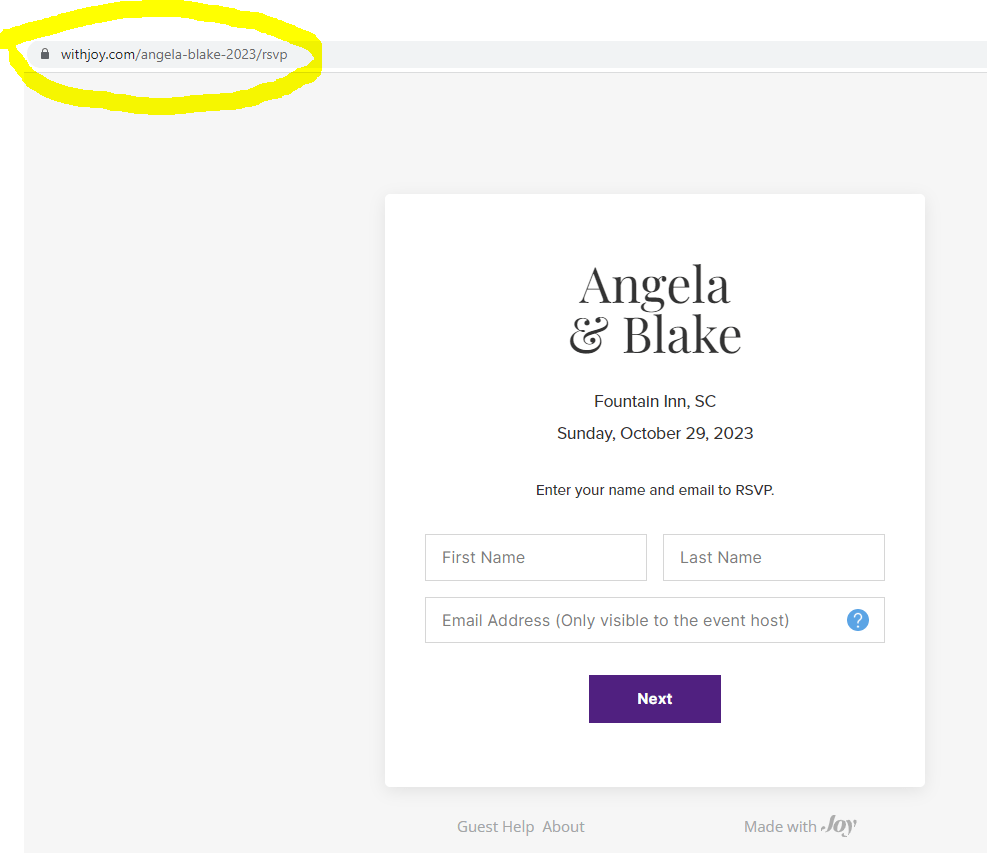
Now it’s time to make the actual QR code you’ll use for
your rsvp cards. Make one for free at QR Code Generator. Simply paste the URL you
copied into their uploader, which looks like this:

It will generate a QR code for you from the link you provide. Then, click ‘download’ and download the QR image to your computer. Then you need to print your QR code on your RSVP cards.
Now you’re ready to go! Once you have the QR code, you’re able to upload it onto a QR code rsvp card, which you’ll use to send to your guests with your invitations. There are a few places to get QR code rsvp cards printed and my favorite is Zazzle. You can browse designs to suit your style here. I’ve found so many beautiful options— so, the sky is the limit! Choose a design you like best. You can even upload your own design as well!
One of my favorite designs is this one by Memorable Modern. It explains the QR code pretty easily to guests, informing them to send in their responses via the QR code or the wedding website you have set up.
How do I use a wedding QR code?
Using a QR code is easy and hassle-free. First, make sure your guests have a smartphone with a camera and a QR code reader app installed. To scan the QR code, they can simply open the app and point their camera at the code. The app will then read the code and redirect them to the digital RSVP page which is on your wedding website.
Once on the page, guests can quickly and easily fill out their digital RSVP without having to worry about mailing back a physical card.
How do I track responses?
You will need to create a wedding website using an online service such as Zola, With Joy, or The Knot etc. These services offer an online rsvp page so when guests respond, the site will update the list of responses. With Joy even has an option to assign tags to specific guests so you narrow down your list if needed!
Pros and Cons
Like anything in life, using a QR code for your wedding RSVP process comes with its own set of pros and cons. Let’s take a look at them:
Pros:
- Eco-friendly – You’re doing your bit for the environment by eliminating the need for paper RSVP cards.
- Time-saving – Your guests won’t have to worry about mailing back the RSVP card or going to the post office.
- Convenient – Your guests can RSVP instantly by scanning the QR code using their smartphone.
- Cost-effective – You won’t have to spend money on printing, postage, or the RSVP card itself.
- Easy to manage – You can easily keep track of responses using the QR code generator’s analytics tool.
Cons: - Tech-savvy guests – Not all your guests may be tech-savvy or have access to smartphones, making it difficult for them to RSVP.
- Potential technical glitches – Like any technology, there may be potential glitches with the QR code reader app or generator, making it difficult for guests to RSVP.
- Privacy concerns – Some guests may have privacy concerns with scanning the QR code and may not want to use their smartphone to RSVP.
 Lovely Luna Events Co.
Leave a comment